Mi 10T Pro 5G Mi Cloud Bypass: TFT Unlock Tool Latest Method 2025

Security Status: SAFE
Scanned by 65+ antivirus engines • No threats detected
Screenshots & Preview
Click on images to view full size (1 images)
| File Name: | Mi 10T Pro 5G Mi Cloud Bypass: TFT Unlock Tool Latest Method 2025 |
|---|---|
| Version: | MIUI 12.5 and 13 |
| Status: | 100% Tested |
| File Size: | 2 MB |
| Compatible OS: | Windows 7, 8, 10, 11 (32-bit & 64-bit) |
Complete guide to remove Mi Cloud lock from Disable Mi Cloud File of Xiaomi Mi 10T Pro 5G [Gauguin] without relocking. Use TFT Official Unlock Tool in Mi Assistant sideload mode for permanent bypass. Tested method works on MIUI 13.5. Follow our detailed instructions for successful Mi Cloud disable.
Xiaomi Mi 10T Pro 5G Mi Cloud Disable Without Relock – Complete Guide
If you’re looking to disable Mi Cloud on your Xiaomi Mi 10T Pro 5G device without facing relock issues, this comprehensive guide will walk you through the entire process using the TFT Official Unlock Tool. This tested method ensures your device remains unlocked after the Mi Cloud removal process.
Prerequisites and Important Information
Important Note: This Mi Cloud disable method is compatible only with MIUI v13.5 and earlier versions. Newer MIUI versions after v13.5 are not supported with this method. Please verify your MIUI version before proceeding.
Note! if MIUI V13.5 not work then downgrade with MIUI 12.5
Required Tools and Files
- TFT Official Unlock Tool (Latest Version)
- Download Disable Mi Cloud File on Xiaomi Mi 10T Pro 5G device with MIUI v13.5 or earlier
- USB cable for device connection
- Windows PC with Mi Assistant installed
- Stable internet connection
Step-by-Step Guide to Disable Mi Cloud
Step 1: Download and Launch TFT Official Unlock Tool
Begin by downloading the TFT Official Unlock Tool from a trusted source. Extract the downloaded files to a folder on your desktop for easy access. Launch the tool by running it as administrator to ensure proper permissions for the unlocking process.
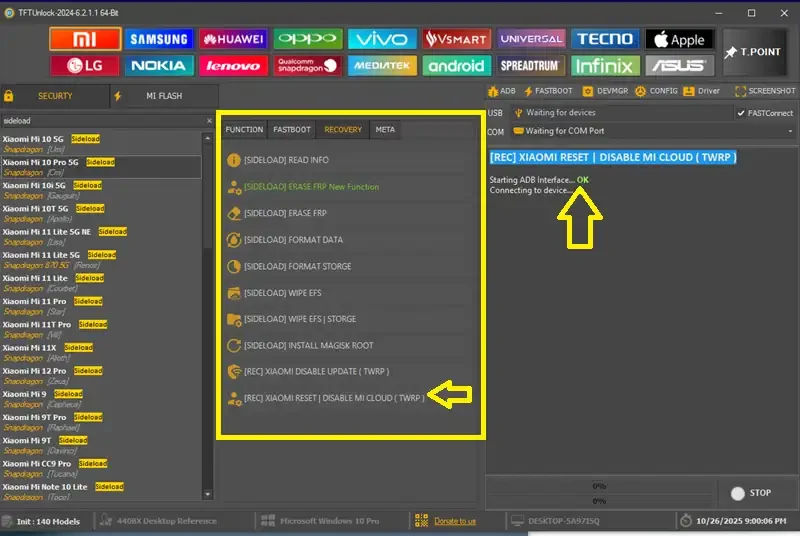
Step 2: Navigate to Mi Tab and Select Device Model
Once the TFT Unlock Tool is open, locate and click on the “Mi Tab” within the interface. From the dropdown menu, carefully select your specific device model – in this case, choose “Xiaomi Mi 10T Pro 5G” from the available options.
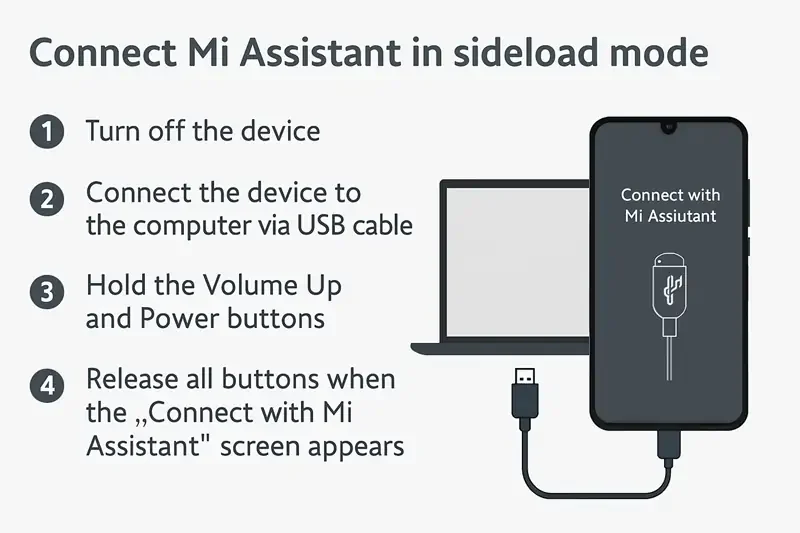
Step 3: Connect Device in Mi Assistant Sideload Mode
To enter Mi Assistant Sideload Mode on your Xiaomi Mi 10T Pro 5G:
- Power off your device completely
- Press and hold Volume Up + Power buttons simultaneously
- When the Mi logo appears, release the Power button but continue holding Volume Up
- Select “Connect with Mi Assistant” from the recovery menu
- Connect your device to the PC using the USB cable
Step 4: Execute Mi Cloud Disable Process
With your device connected in sideload mode, follow these critical steps:
- In the TFT Unlock Tool, locate and click on “Erase FRP New Functions”
- A new window will appear with various options
- Select “Click To Erase Disable Mi Cloud in TWRP”
- Wait for the process to complete – this typically takes 3-5 minutes
- Do not disconnect your device during this process
Step 5: Complete the Process and Reset Device
Once the Mi Cloud disable process shows “Done” or “Success” in the tool:
- Safely disconnect your device from the PC
- Perform a factory reset on your Xiaomi Mi 10 Pro 5G
- Set up your device as new without Mi Account restrictions
- Your device will not relock to Mi Cloud after the reset
Troubleshooting Common Issues
Device Not Detected in Sideload Mode
If your device isn’t recognized, ensure you have the latest Xiaomi USB drivers installed on your PC. Try using a different USB cable or port if the issue persists.
Process Fails or Gets Stuck
Verify that your device is running MIUI v13.5 or an earlier version. The process will not work on newer MIUI versions. Additionally, ensure your device battery is charged above 50% before starting.
Important Warnings and Disclaimers
⚠️ Version Compatibility: This method exclusively works with MIUI v13.5 and earlier versions. Attempting this process on newer MIUI versions may result in failure or device issues.
Legal Notice: Only use this method on devices you own. Removing Mi Cloud from stolen or lost devices is illegal and unethical. This guide is intended for legitimate device owners who have forgotten their Mi Account credentials.
Conclusion
Successfully disabling Mi Cloud on your Xiaomi Mi 10T Pro 5G using the TFT Official Unlock Tool provides permanent freedom from Mi Account restrictions. Remember to always verify your MIUI version compatibility before attempting this process. With this tested method, you can safely remove Mi Cloud without worrying about device relock issues.
Easy Installation
Simple setup process with clear instructions
Safe & Secure
Scanned and verified free from malware
Fast Download
Multiple mirror servers for fastest download speeds
Minimum Requirements
Recommended
- Latest version with all current features
- Bug fixes and performance improvements
- Security updates and patches
- Compatibility improvements
Rate & Review This Software
User Reviews
No reviews yet. Be the first to review!
About the Author / Developer
📱 Related Apps You May Like









Download Mirror Options
Choose your preferred download server:
How to Install
- Click the Download button above
- Wait for download to complete
- Run the installer file (.exe)
- Follow the installation wizard
- Launch the application
How to Extract (ZIP/RAR)
- Download and install WinRAR or 7-Zip
- Multi-part archives: Download all parts (.part1.rar, .part2.rar) into the same folder
- Right-click on any one part (usually .part1.rar)
- Select "Extract Here" or "Extract to folder"
- Tool will auto-extract all parts