Tera Tool V1.0.2.7 Full Working by GCT Team – Free Download

Security Status: SAFE
Scanned by 65+ antivirus engines • No threats detected
Screenshots & Preview
Click on images to view full size (1 images)
Unlock any device for free. Download the Tera Tool V1.0.2.7 released by the GCT Team. Supports advanced authorization for Oppo, Vivo, Xiaomi, and Samsung devices without a dongle.
The Tera Tool V1.0.2.7 is a powerful multi-brand utility for mobile technicians, originally a premium software. Thanks to the GCT Team, this Full Version allows users to access advanced features for Oppo, Vivo, Xiaomi, Samsung, and Huawei without a physical dongle or paid license. It is a key component of the GSM Windows Pack Toolkit.
Key Features
🚀 Specialized Operations
- Oppo/Realme: Advanced Authorization for MTK chipsets (e.g., Oppo A54 CPH2239). Fix “Dead Boot” and “Download Not Completed” errors.
- Vivo: Remove Demo Mode, Safe Format (Keep Data), and Reset FRP via Brom/Test Point.
- Xiaomi: Bootloader Unlock, Mi Account Disable, and “System Destroyed” Fix.
- Samsung: FRP Reset (MTP/ADB/Download Mode) and KG (Knox Guard) support.
🛠️ Advanced Functions
- Universal MTK: “Force BROM Mode” and “Advanced Authorization” for Preloader mode operations.
- Flashing: Full Scatter/DA flashing for MediaTek and XML flashing for Qualcomm (EDL).
- Partitions: Read/Write/Erase specific partitions (Userdata, FRP, NVRAM, etc.).
- Diagnostics: Read full device info (CID, Storage Type, DRAM size) as seen in the log.
Technical Specs & Log Proof
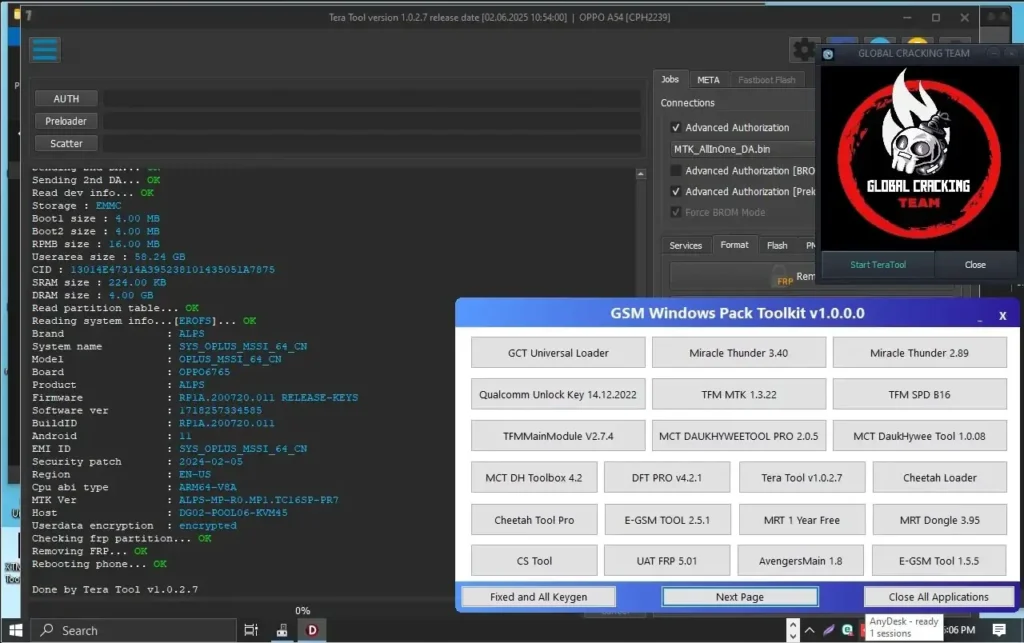
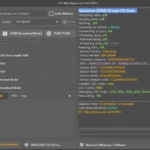
As seen in the verified screenshot, the tool successfully connects to devices like the Oppo A54 (CPH2239) on Android 11, performing critical tasks like Removing FRP... OK and Rebooting phone... OK in seconds.
| Tool Name | Tera Tool |
| Version | V1.0.2.7 |
| Released By | GCT Team |
| Included In | GSM Windows Pack Toolkit v1.0.0.0 |
| Status | Free / Full (No Dongle) |
| OS Support | Windows 10 / 11 (64-bit) |
How to Install & Activate
- Disable Security: Windows Defender may flag the “Loader” or “Toolkit”. You must disable Real-Time Protection for the software to launch correctly.
- Download: Tera Tool v1.0.2.7 Get the (or standalone Tera Tool RAR) from the link below.
- Extract: Unzip the file to your desktop.
- Select Tool: Click on the button labeled “Tera Tool v1.0.2.7”.
- Loader Launch: The “GCT Team” loader window (with the skull logo) will appear. Click “Start TeraTool”.
- Connect Device:
- Power off the phone.
- Hold Volume Up + Down.
- Connect USB Cable to trigger BROM/EDL mode.
⚠️ Disclaimer:
This software is a modified version provided for educational and maintenance purposes. Professional technicians should support the original developers by purchasing the official Tera Tool license for guaranteed stability and updates.
Easy Installation
Simple setup process with clear instructions
Safe & Secure
Scanned and verified free from malware
Fast Download
Multiple mirror servers for fastest download speeds
Minimum Requirements
Recommended
- Latest version with all current features
- Bug fixes and performance improvements
- Security updates and patches
- Compatibility improvements
Rate & Review This Software
User Reviews
this tool
it s work fine thanks TFT tool wait for update
Tera Tool V1.0.2.7 Full Working by GCT Team
Thanks for make this software is to much good and smooth work Tera Tool V1.0.2.7 Full Working by GCT Team
About the Author / Developer
📱 Related Apps You May Like




Download Mirror Options
Choose your preferred download server:
How to Install
- Click the Download button above
- Wait for download to complete
- Run the installer file (.exe)
- Follow the installation wizard
- Launch the application
How to Extract (ZIP/RAR)
- Download and install WinRAR or 7-Zip
- Multi-part archives: Download all parts (.part1.rar, .part2.rar) into the same folder
- Right-click on any one part (usually .part1.rar)
- Select "Extract Here" or "Extract to folder"
- Tool will auto-extract all parts


Software is good working i test with my device thank you
Software is good work and tested i an today test my devices using Tera Tool V1.0.2.7 Full Working by GCT Team
Good software