TFT Huawei Fastboot Tool v1.0.0 – IMEI Reader & FRP Reset

Security Status: SAFE
Scanned by 65+ antivirus engines • No threats detected
Screenshots & Preview
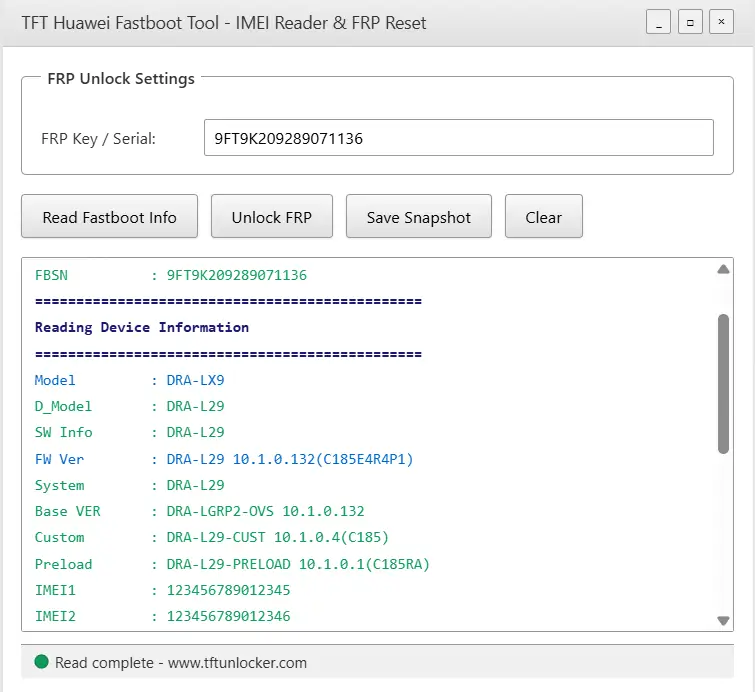
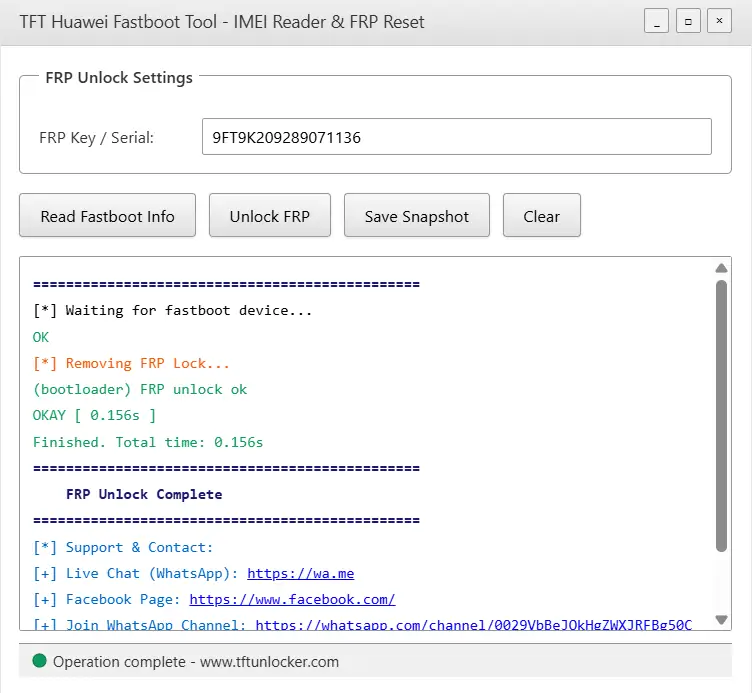
Click on images to view full size (2 images)
The TFT Huawei Fastboot Tool v1.0.0 is a specialized utility designed for mobile technicians to extract critical data such as the Serial Number, IMEI1, IMEI2, and MEID from Huawei devices. This software provides comprehensive hardware insights, including the Product Model, Device Model, and the unique HW_KEY, while also displaying detailed software metrics like the System Version, Base Version, Custom Version, and Preload Version. For security analysis, the tool identifies the Bootloader Lock Status and FRP State, alongside system-level data like the Build Number, Rescue Version, and Firmware State. Users can also determine regional configurations via the Vendor Country and Region Code, and monitor hardware health through the Battery Voltage (mV) and real-time Battery Status.
Developed as a native C++ application, this tool ensures high performance and stability during sensitive operations. It features a modern interface with multi-threaded capabilities, allowing for non-blocking operations and real-time logging. Beyond simple data reading, it provides advanced functionality for Factory Reset Protection management and the ability to export all gathered device information into a formatted PNG snapshot for documentation and repair logs.
📥 Installation
- Download the TFT Huawei Fastboot Tool archive to your local storage.
- Extract the contents to a dedicated folder on your PC.
- Verify that the executable and all DLL files are located in the same directory.
- Right-click on open HuaweiFastboot.exe and select Run as Administrator.
🚀 Usage Guide
Reading Device Info
- Power off the Huawei device completely.
- Enter Fastboot mode by holding Volume Down and connecting the USB cable.
- Click the Read Fastboot Info button in the software interface.
Unlocking FRP
- Ensure the device is detected in fastboot mode.
- Input your specific FRP unlock key into the provided text field.
- Execute the Unlock FRP command and monitor the log for success.
✨ Key Features
Device Information Extraction
- Comprehensive identification of hardware including IMEI, MEID, and Serial Numbers.
- Detailed software reporting covering system, base, custom, and preload versions.
- Security auditing for bootloader lock status and FRP protection states.
- Regional detection identifying vendor country and specific region codes.
FRP Management
- Secure Factory Reset Protection unlocking using valid unlock keys.
- Real-time key validation and status reporting during the unlock process.
- Direct fastboot communication for reliable command execution.
Advanced Tools and UI
- Snapshot export feature to save device details as a professional image file.
- Color-coded logging system for better diagnostic visibility.
- Automatic detection of devices connected in fastboot mode.
- Professional GDI+ graphics rendering for high-quality snapshots.
Minimum Requirements
🖥️ Requirements
Operating SystemWindows 10, Windows 11 (64-bit recommended)
Architecturex86/x64
USB PortUSB 2.0 or 3.0 physical port
DriversHuawei USB COM Drivers properly installed
DependenciesAdbWinApi.dll, AdbWinUsbApi.dll, and static_fastboot.exe
📜 What’s New
Version 1.0.0
- Initial public release of the Huawei Fastboot utility.
- Added support for modern Huawei chipset identification.
- Integrated snapshot export functionality for repair documentation.
- Implemented real-time battery voltage monitoring in fastboot.
- Optimized multi-threaded logging for faster operation feedback.
Rate & Review This Software
User Reviews
TFT Huawei Fastboot Tool
TFT Huawei Fastboot Tool
Outil Fastboot TFT Huawei v1.0.0 Lecteur IMEI et rinitialisation FRP
Un logiciel incontournable dans le domaine des GSm
TFT Huawei Fastboot Tool v1.0.0
Great software personally using it awesome
Great
Very Useful and handy
TFT Huawei Fastboot Tool v1.0.0
Thanks for make this software is too much good and smooth TFT Huawei Fastboot Tool v1.0.0
TFT Huawei Fastboot Tool v1.0.0 is good software for mobile technician
TFT Huawei Fastboot Tool v1.0.0
Best work tool
this tool
it s work fine thanks TFT wait for update
TFT Huawei Fastboot Tool v1.0.0
This is a great tool admin
TFT Huawei Fastboot Tool v1.0.0
Thanks for make this software is to much good and smooth work on TFT Huawei Fastboot Tool v1.0.0
About the Author / Developer
📱 Related Apps You May Like




Download Mirror Options
Choose your preferred download server:
How to Install
- Click the Download button above
- Wait for download to complete
- Run the installer file (.exe)
- Follow the installation wizard
- Launch the application
How to Extract (ZIP/RAR)
- Download and install WinRAR or 7-Zip
- Multi-part archives: Download all parts (.part1.rar, .part2.rar) into the same folder
- Right-click on any one part (usually .part1.rar)
- Select "Extract Here" or "Extract to folder"
- Tool will auto-extract all parts

Software is good work and tested i am today test my devices using TFT Huawei Fastboot Tool v1.0.0
thanks for this gift rmadan mubark
Great tool for reading IMEI and resetting FRP. The guide is clear and easy to follow. Very helpful for Huawei users.
100% Working tool Tnq
good porgram thankyo
Software is good working i test with my device thank you
Best tool u made thanks for this..
Software is good working i test with my device thank you
good tft unloucker tool
good tft unlocker tool
good tft unlocker tool
Tft is good tool
TFT Huawei Fastboot Tool v1.0.0 – IMEI Reader & FRP Reset Nice Work
Software is good working i test with my device thank you best tft unlocker tool
Dear TFT Team Your Work Is Too Good
Thanks Bro Tool Working 100% Thanks Alot ❤️
Thanks Bro Tool Working 100% Thanks Alot Good Job
Aowsome
I Have Done 2 Phones Using This Tool Thanks
Developer
Love From India
Aowsome
I Have Done 2 Phones Using This Tool Thanks
Developer
Love From India
Thanks Again
Thanks For Make This Software Is Too Much Good And Smooth Work On Tft Huawei Passbook Tool V1.0.0
TFT Huawei Fastboot Tool v1.0.0 – IMEI Reader & FRP Reset Nice Work
Software is good working i test with my device thank you
Great tool for reading IMEI and resetting FRP thank you
TFT Huawei Fastboot Tool v1.0.0 is a beautyfull tool for frp fastboot
Best softwear for frp and read imei
TFT Huawei Fastboot Tool v1.0.0 IMEI Reader amp FRP Reset good tools and so smooth
FRP Reset good tools and so smooth grate tool.. thank you sir…
Good software
Outil TFT Huawei Fastboot v1.0.0 : lecteur IMEI et réinitialisation FRP. Un outil performant et très fluide.
good porgram thankyo
TFM Huawei Best tool this year.
All Huawei krin cpu frp remove smoothly
Superb software
TFT Huawei Fastboot Tool v1.0.0 good
TFT Huawei Fastboot Tool v1.0.0 good working