Download TPS Tool V3.1 (No Dongle) – Xiaomi Unlock & Fix Tool

Security Status: SAFE
Scanned by 65+ antivirus engines • No threats detected
Screenshots & Preview
Click on images to view full size (1 images)
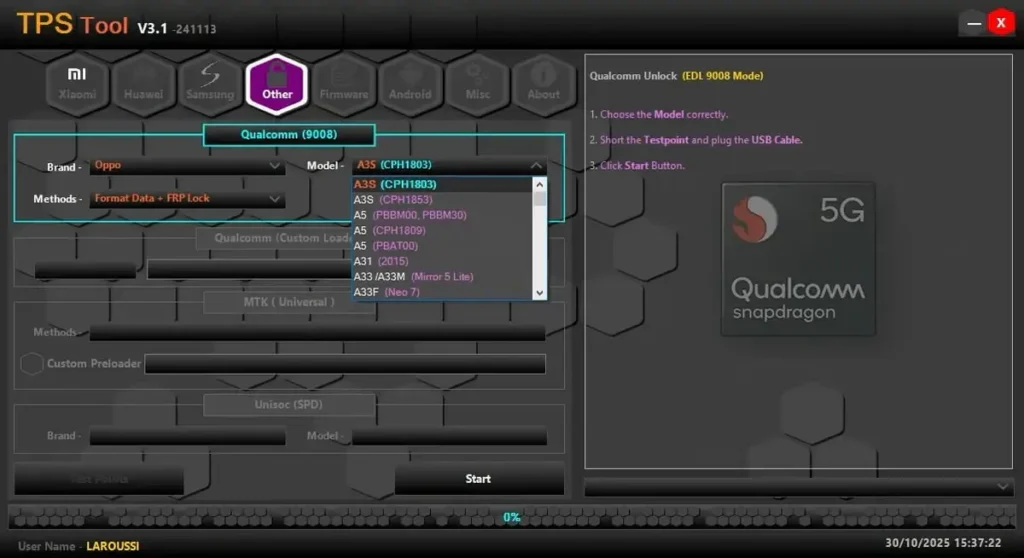
Unlock your Xiaomi device for free. Download the TPS Xiaomi Tool V3.1 Offline Version. No dongle or internet required. Safely remove Mi Accounts, bypass FRP, and fix destroyed sensors.
The TPS Xiaomi Tool V3.1 is a legendary utility for mobile technicians, specifically designed for Xiaomi (Redmi/Poco) devices. While modern tools require expensive credits, this Offline Version of TPS V3.1 allows you to perform critical repairs without a dongle or internet connection. It is particularly famous for its ability to fix “Sensor Issues” by repairing the persist partition and bypassing Mi Accounts on older security patches.
Tool Features & Capabilities
- Mi Account Bypass: Remove or bypass the Mi Cloud lock on supported devices (Anti-Relock features included).
- FRP Reset: One-click Factory Reset Protection removal via Fastboot or EDL mode.
- Persist Repair: The #1 feature of this tool. It fixes “System has been destroyed” or non-working sensors (Rotation, Proximity) by restoring the
persist.imgfile. - Bootloader Operations: Check bootloader status, unlock (unofficial methods), and relock.
- Backup & Restore: Create backups of EFS/QCN partitions to prevent IMEI loss during flashing.
- Offline Mode: Runs completely offline. No server credits or login required.
Technical Specs
| Tool Name | TPS Xiaomi Tool |
| Version | V3.1 (Offline Edition) |
| Developer % Credit | TPS Team |
| File Size | ~230 MB |
| Compatibility | Windows 7, 8, 10, 11 (Disable Defender) |
| License | Free (No Dongle) |
How to Install & Use
- Disable Antivirus: Windows Defender may flag the “Keygen” or “Loader” as false positive. Turn it off temporarily.
- Download & Extract: Download the zip file and extract it to your desktop.
- Run Installer: Install the main setup file
TPS_Tool_v3.1.exe. - Activation:
- Open the shortcut created on the desktop.
- If it asks for a key, run the included KeyGen.
- Copy the “Hardware ID” from the tool to the Keygen, generate a key, and paste it back to register.
- Connect Phone: Enable USB Debugging (ADB) or boot into Fastboot/EDL mode and start repairing.
Watch Video Full guideline to activation tool
Video Link https://t.me/tftunlocker/11
⚠️ IMPORTANT NOTE:
This tool is excellent for older Xiaomi models (Redmi Note 4, 5, 6, 7, 8, etc.). For newer devices with HyperOS or Android 13+, this tool may not work efficiently. Use it primarily for fixing sensors and unlocking older units.
Easy Installation
Simple setup process with clear instructions
Safe & Secure
Scanned and verified free from malware
Fast Download
Multiple mirror servers for fastest download speeds
Minimum Requirements
Recommended
- Latest version with all current features
- Bug fixes and performance improvements
- Security updates and patches
- Compatibility improvements
Rate & Review This Software
User Reviews
No reviews yet. Be the first to review!
About the Author / Developer
📱 Related Apps You May Like




Download Mirror Options
Choose your preferred download server:
How to Install
- Click the Download button above
- Wait for download to complete
- Run the installer file (.exe)
- Follow the installation wizard
- Launch the application
How to Extract (ZIP/RAR)
- Download and install WinRAR or 7-Zip
- Multi-part archives: Download all parts (.part1.rar, .part2.rar) into the same folder
- Right-click on any one part (usually .part1.rar)
- Select "Extract Here" or "Extract to folder"
- Tool will auto-extract all parts